

Optimizing your WiFi
Tips & tricks for better WiFi connection

Are you experiencing a disruption?
First check whether there is a known outage before troubleshooting your WiFi connection.
The best location for Your Connect Box 5 Ultra
The position of your modem has a direct impact on reception, speed and WiFi coverage. Use the signal indicator on the display to find the best location.
How to keep your modem happy:

Place the modem in an elevated position
Place your Connect Box 5 Ultra as high as possible, for example on a shelf or sideboard.
Leave sufficient free space around the modem
Ensure there is enough free space around the device so that it can dissipate heat properly and distribute the WiFi signal optimally.
Face it towards the room
Position the modem so that the LED indicators face into the room.
Keep the modem upright
The Connect Box 5 Ultra is designed to operate in an upright position.
Things to avoid: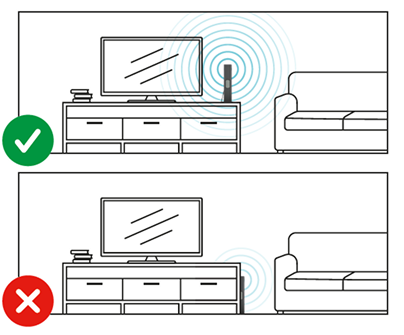

Do not hide or enclose the modem
Do not place the modem inside cupboards or storage units and do not hide it behind furniture.
Do not place the modem in a corner
The modem’s WiFi antennas should be able to transmit freely in all directions.
Do not lay the modem on its side
Keep the modem in the upright position intended by the manufacturer.
Avoid sources of interference
Keep your modem away from sources of interference.
Avoid placing the following devices near the modem:
Cordless phone base stations
Baby monitors
Microwave ovens
Bluetooth devices
Surveillance cameras

Check the signal strength on the display
Use the signal indicator on the touch display of the Connect Box 5 Ultra:
4–5 bars: Excellent reception
3 bars: Good reception
1–2 bars: Consider relocating the modem
Tip: If only 1–2 bars are displayed, move the modem to another location until a stronger signal is shown.
Optimize WiFi frequency automatically
The Connect Box 5 Ultra supports multiple WiFi frequency bands and automatically selects the best connection for your devices.
Benefits include:
Higher device speeds
More stable connections over longer distances
Automatic optimisation without manual adjustments
Use a network cable instead of WiFi (WLAN)
For the fastest and most stable internet connection, connect your computer to the modem using a network cable (Ethernet).